iO8-LoRa Wireless Expander
1. Description
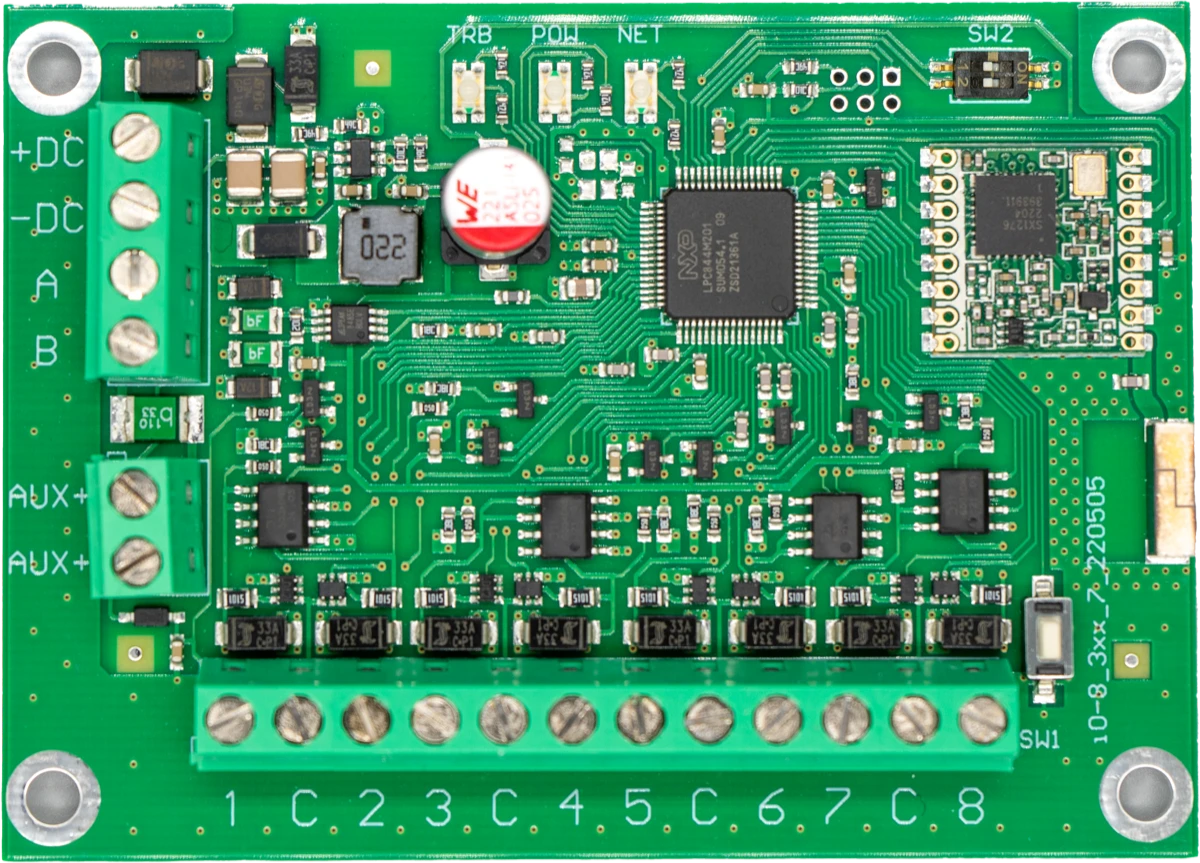
iO-8-LORA wireless expanders with RF-LORA transceiver increase the number of inputs and outputs of the "FLEXi" SP3 security panel using two-way RF communication.
Compatible with the SP3 security control panel and GATOR Cellular gate & door access controller. The iO-8-LORA wireless expander has 8 I/O terminals, each of which can be set as an input (IN) or as an output (OUT).
1.1 Features
Communication:
-
Line-of-sight wireless range up to 5000 m.
-
Up to 8 iO-8-LORA wireless expanders can be connected to the "FLEXi" SP3 control panel.
-
Products from HW iO8_x5xx_7_230419 version come with a standard antenna suitable for most applications. In cases where it is necessary to provide high-quality communication at the maximum possible distance, an antenna (AX-ANT-KIT – 433 MHz, AX-ANT01S SF – 868 MHz) with a higher radio signal gain should be used.
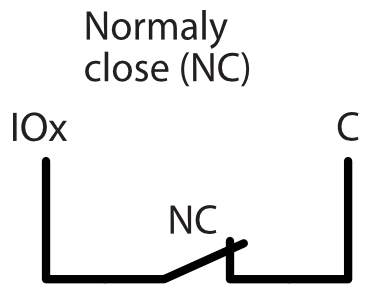
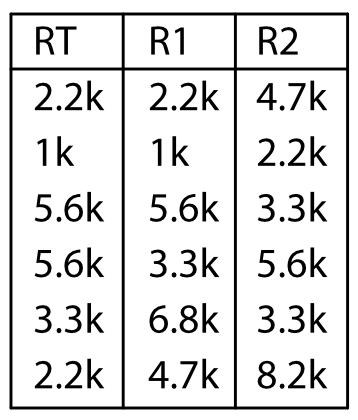
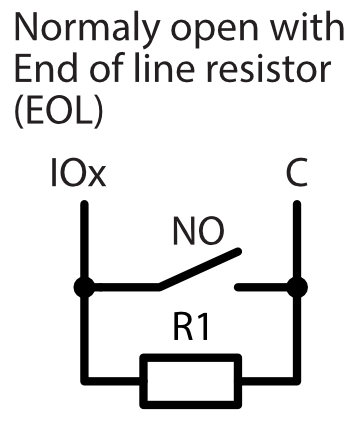
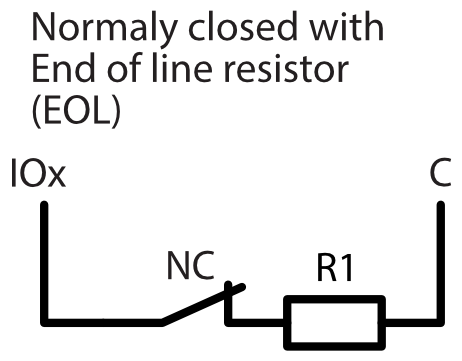
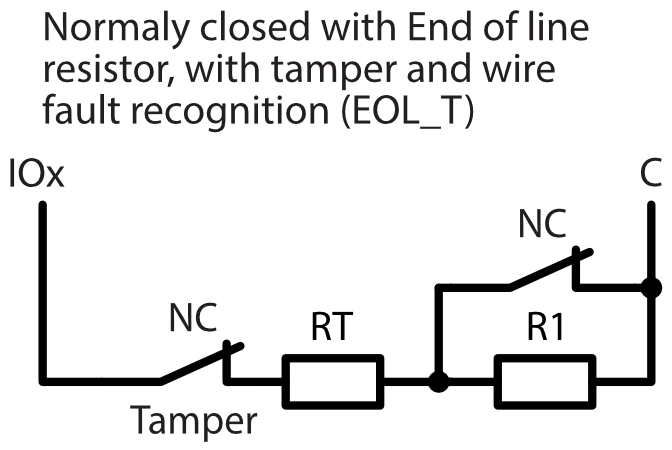
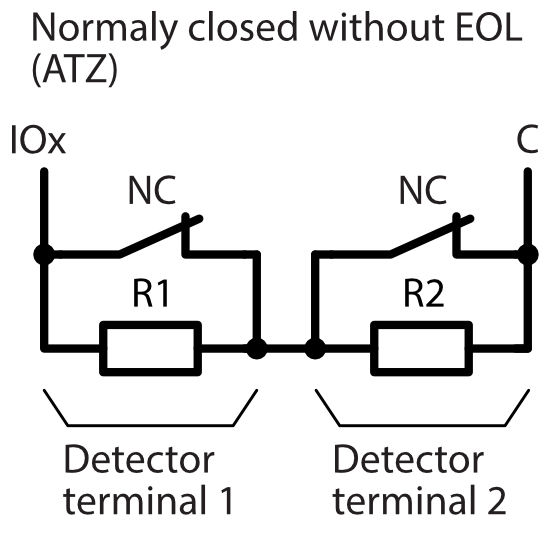
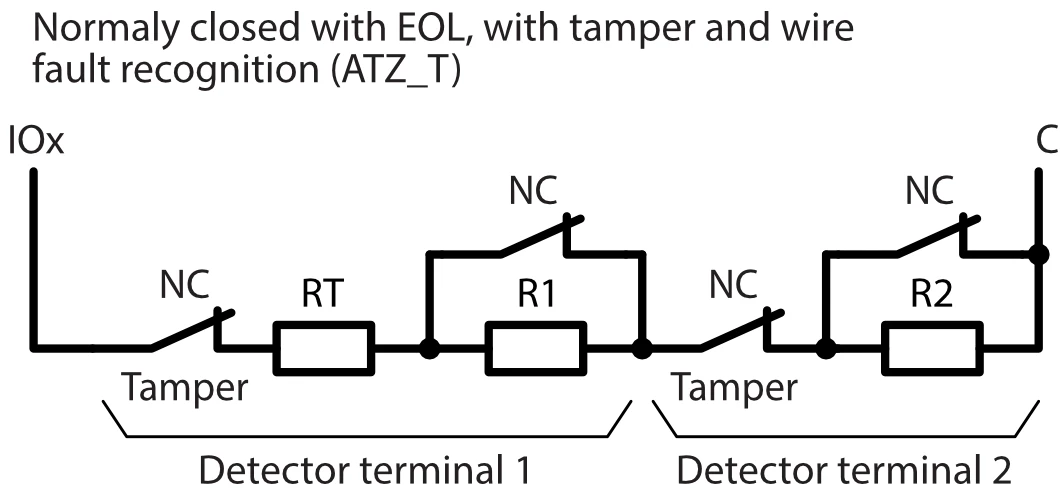
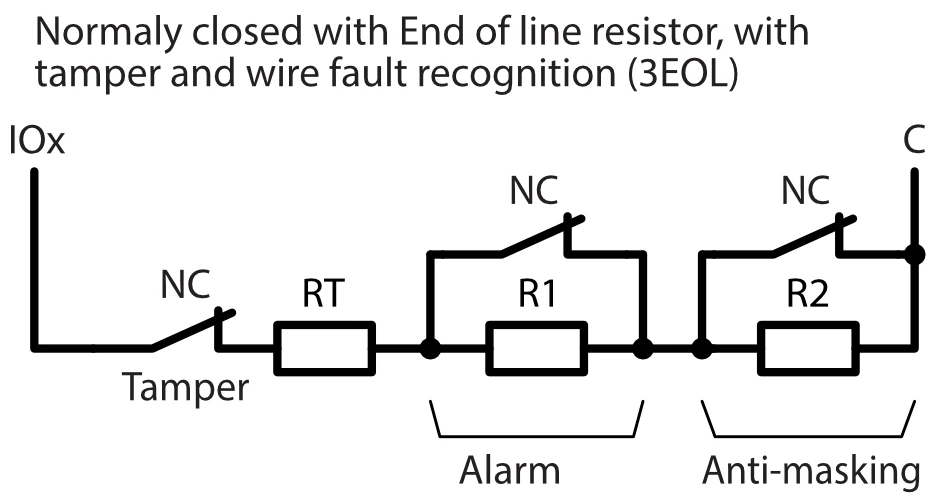
Inputs and outputs: - 8 I/O terminals, each one can be set as an input (IN) or output (OUT). Input (IN) types: ATZ, EOL, NC, NO. Different value of resistors can be used in EOL and ATZ type circuits.
Connection:
- The iO-8-LORA wireless expander is connected to the "FLEXi" SP3 control panel via the RF-LORA transceiver.
1.2 Specifications
| Parameter | Description |
|---|---|
| Transmission frequency | 4F modification: 433,3 - 434,7 MHz / 8F modification: 867 - 869 MHz |
| Modulation type | LORA |
| Power supply voltage | 10-26 V DC |
| Current consumption | Up to 50 mA (stand-by) / Up to 120 mA (short-term, while sending) |
| Report encryption | Yes |
| Range in open space | Up to 5000 m |
| Dual purpose terminals [I/O] | 8, IN or OUT function selected during programming. When IN is selected, available types: NC, NO, EOL, EOL_T, 3EOL, ATZ, ATZ_T. When OUT is selected, the terminal becomes open collector (OC) type with up to 100 mA current |
| Operating environment | Temperature from –20 °C to +50 °C, relative humidity – up to 80% at +20 °C |
| Dimensions | 65 x 90 x 12 mm |
| Weight | 80 g |
1.3 Expander elements
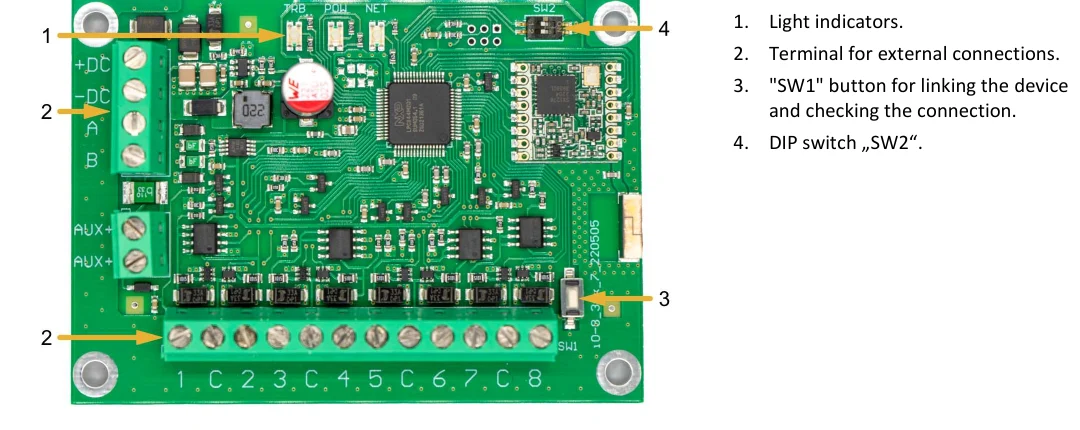
DIP switch 'SW2' settings
For product HW iO8_x5xx_7_230419 version:
- Radio frequency (
OFF- RF1;ON- RF2). Intended for changing the radio channel if the current channel is heavily loaded. - Modulation type (
OFF- fast;ON- slow). TheONposition allows you to increase the communication distance by about 2 times (depending on the environmental conditions). But if a quality connection is ensured using theOFFposition, it is recommended to use it. In theONposition, system performance decreases.
NOTE: In iO8-LORA and RF-LORA devices, the positions of the SW switch must match! Otherwise, the radio communication will not work!
1.4 Purpose of terminals
| Terminal | Description |
|---|---|
| +DC | Power terminal (10-26 V DC positive) |
| -DC | Power terminal (10-26 V DC negative) |
| A | Terminal A of RS485 data bus |
| B | Terminal B of RS485 data bus |
| 1- 8 | Input/output terminals |
| C | Common negative terminal |
1.5 LED indication of operation
| Indicator | Light status | Description |
|---|---|---|
| NETWORK | Off | No RF signal |
| NETWORK | Green blinking | RF signal level from 0 to 10. Sufficient strength is 3 |
| POWER | Off | No supply voltage |
| POWER | Green blinking | Normal supply voltage level |
| POWER | Yellow blinking | Low supply voltage level (≤11.5 V) |
2. Wiring schematics
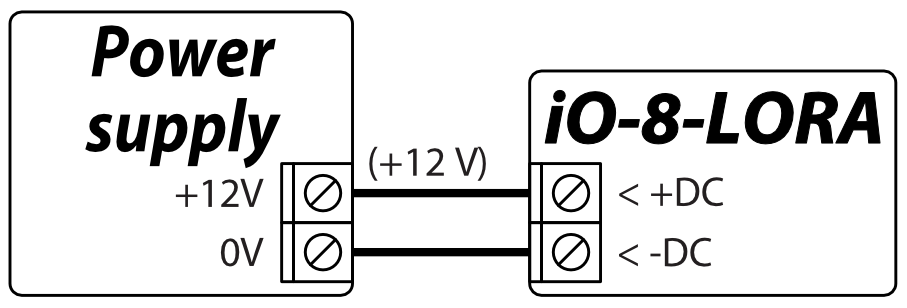
2.1 Schematic for connecting the power supply
2.2 Schematics for connecting inputs
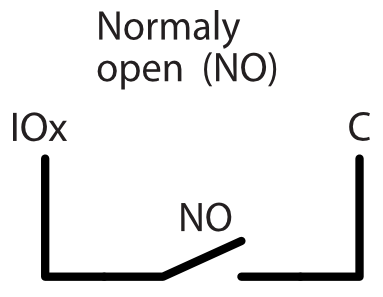
There are 8 terminals IO1–IO8 (inputs) on the iO-8-LORA expander board for connecting sensor circuits. Any terminal can be set as an input and assigned zone attributes: circuit type (NO, NC, EOL, EOL_T, 3EOL, ATZ, ATZ_T); sensitivity to temporary circuit events; zone function (Delay, Instant, Instant Stay, Interior, Interior Stay, Fire, Keyswitch, 24_hour, Silent, Silent 24h).
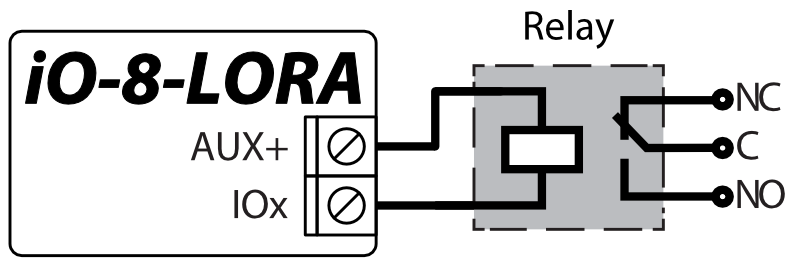
2.3 Schematic for connecting a relay
Using the relay terminals, it is possible to remotely control (turn on/off) various electrical devices. The iO-8-LORA wireless expander universal I/O terminal must be configured as an output (OUT) and must have the definition "Remote control" assigned.
2.4 Schematic for connecting iO-8-LORA expanders to the control panel "FLEXi" SP3
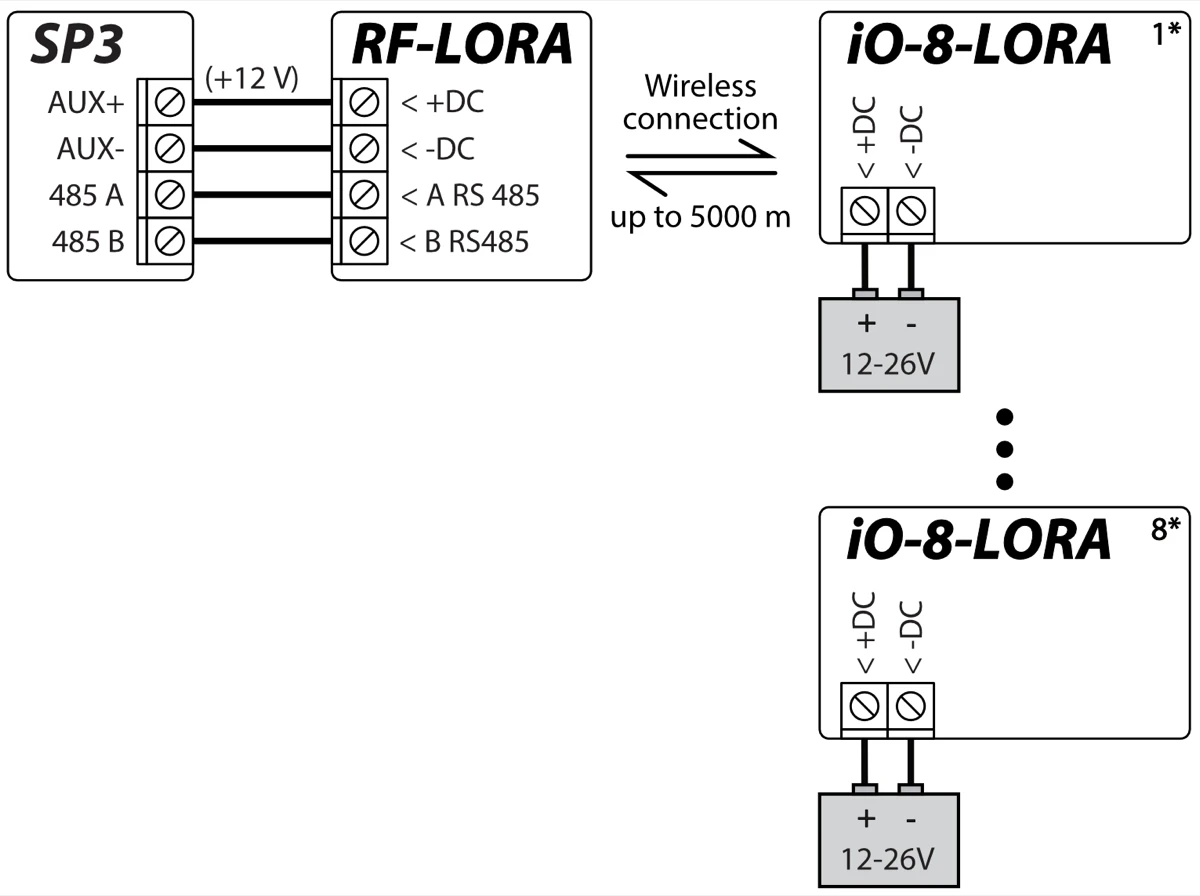
Note
An RF-LORA transceiver must be connected to the "FLEXi" SP3 security panel and then up to 8 pcs. can be connected iO-8-LORA wireless expanders.
3. Security control panel “FLEXi” SP3
-
An RF-LORA transceiver must be connected to the "FLEXi" SP3 control panel.
-
Turn on the power supply of the "FLEXi" SP3 control panel.
-
Turn on the power supply to the iO-8-LORA wireless expander.
-
Launch TrikdisConfig.
-
Connect the "FLEXi" SP3 to a computer using a USB Mini-B cable or connect to the "FLEXi" SP3 remotely.
-
Click the button Read [F4] for the program to read the parameters currently set for the "FLEXi" SP3 control panel. If a window for entering the Administrator code opens, enter the six-symbol administrator code.
-
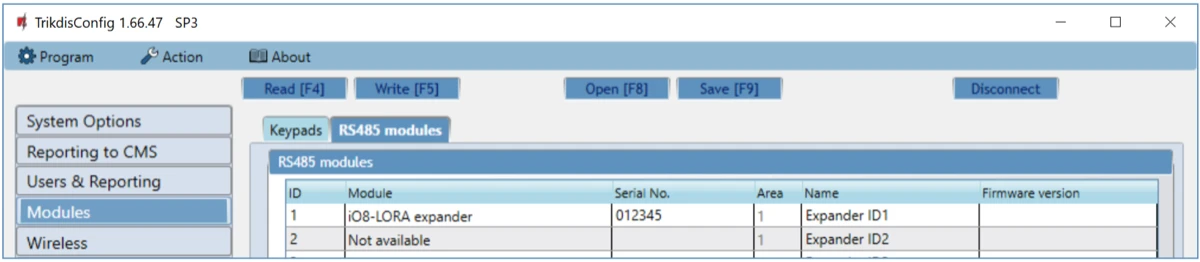
In the "Modules" list, select "iO-8-LORA expander".
-
In the "Serial No." field, enter the serial number of the module iO-8-LORA.
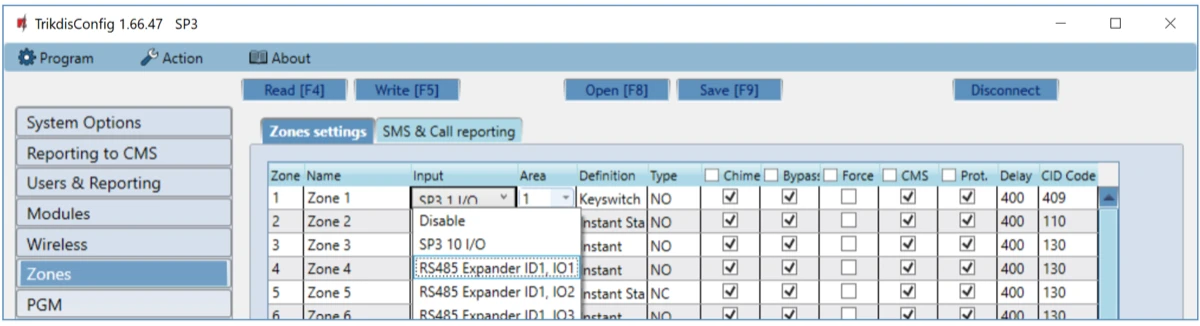
- In the "Zones" tab, make settings for the expander's inputs.
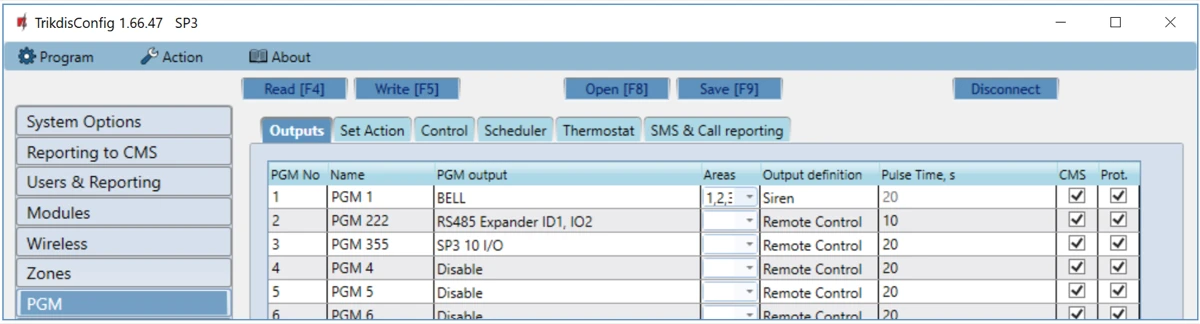
- In the "PGM" tab, configure the expander's PGM outputs.
-
Once configuration is complete, click the Write [F5] button.
-
Wait for the updates to finish.
-
Click the "Disconnect" button and disconnect the USB cable.
4. Safety precautions
The iO-8-LORA wireless expander should only be installed and maintained by qualified personnel.
Please read this manual carefully prior to installation in order to avoid mistakes that can lead to malfunction or even damage to the equipment.
Always disconnect the power supply before making any electrical connections.
Any changes, modifications or repairs not authorized by the manufacturer shall render the warranty void.
 Please adhere to your local waste sorting regulations and do not dispose of this equipment or its components with other household waste.