FLEXi / Keypad SK-LCD TouchPad – Brief User Guide
1. Keypad overview
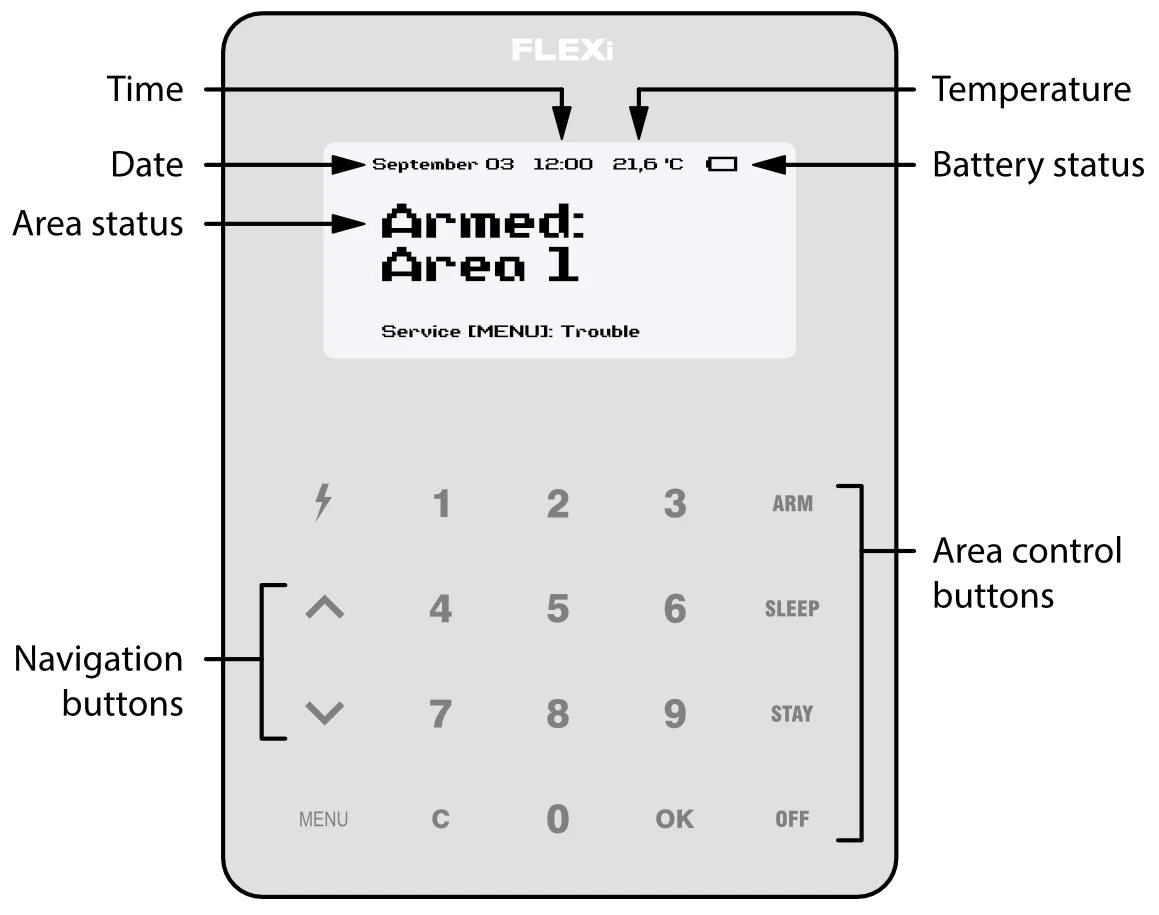
Note
The keypad SK-LCD TouchPad for alarm system control displays the states of 64 zones and 8 partitions. Also, the SK-LCD TouchPad keypad can be assigned to control one or more desired areas (keypad firmware version from FW:1.41, control panel firmware version from FW:SP3_xxx4_0119. The keypad firmware version can be seen by pressing MENU 5 0). The keypad will display the statuses of the assigned area and area zones.
2. Alarm system arming / disarming
2.1 Alarm system ARM
Make sure all areas are not damaged.
-
Press ARM button.
-
Enter [User Code].
-
If the system has only one partition, skip steps 4 and 5.
-
Press the buttons for the areas you want to control.
-
Confirm your selection by pressing the OK button.
-
Exit the premises within the Exit Delay time.
During the Exit Delay countdown, the time for the exit will be displayed on the keypad, and the text will appear on the keypad when the arming mode is activated: Armed: Area.
2.2 Alarm system DISARM
-
Press OFF button.
-
Enter [User Code].
-
If the system has only one partition, skip steps 4 and 5.
-
Press the buttons for the areas you want to control.
-
Confirm your selection by pressing the OK button.
When the alarm is disarmed, the text Disarmed: Area will appear on the keypad display.
Note
For area status changing into the opposite one it is sufficient to enter User code and select the preferred area. To delete symbols or command entered, press button C.
2.3 SLEEP mode activation
(Premises perimeter is secured. Movement inside is allowed. If you open the entrance door, the alarm will actuate immediately):
-
Press SLEEP button.
-
Enter [User Code].
-
If the system has only one partition, skip steps 4 and 5.
-
Press the button of area to be activated.
-
Confirm your selection by pressing the OK button.
-
SLEEP mode will turn on immediately, without exit delay.
-
The following text will appear on the keypad screen: Sleep: Area.
2.4 STAY mode activation
(Premises perimeter is secured. Movement inside is allowed. Any opening of entrance door enables time delay during which you have to disarm the alarm):
-
Press STAY button.
-
Enter [User Code].
-
If the system has only one partition, skip steps 4 and 5.
-
Press the button of area to be activated.
-
Confirm your selection by pressing the OK button.
-
STAY mode will turn on immediately, without exit delay.
-
The following text will appear on the keypad screen: Stay: Area.
3. Emergency buttons
3.1 To send emergency message to your security service
-
Panic – hold 1 button pressed for 3 sec.
-
Medical Aid – hold 4 button pressed for 3 sec.
-
Fire Service – hold 7 button pressed for 3 sec.
4. Illumination brightness and indication sound adjustment
4.1 To adjust keypad illumination brightness and indication sound
-
Press MENU button.
-
Press 5 button.
-
Press the 2 button to adjust the volume and use the

 buttons to set the desired volume. Confirm your selection by pressing the OK button.
 -
Press the 4 button to adjust the screen brightness. Use the
buttons to adjust the desired screen brightness. Confirm your selection by pressing the OK button. -
Press the 3 button to adjust the button brightness. Use the
buttons to set the desired button brightness. Confirm your selection by pressing the OK button.
5. Entering or changing User or Master codes
5.1 To enter a new or change the existing User code
-
Press the
 button.
 -
Enter [Administrator Code] (default code: 123456).
-
Enter User's double-digit sequence number, e.g. 02.
-
Enter the 4-digit [User Code].
-
Re-enter the 4-digit [User Code].
-
Press the sequence numbers of areas which should be controlled by User.
-
Confirm your selection by pressing the OK button.
-
Press the C button to exit the mode.
6. Two-wire fire (smoke) detector reset
6.1 To reset two-wire fire (smoke) detectors
- Hold button pressed for 3 seconds.
Note
Two-wire fire detectors do not reset automatically after fire emergency detection. They can be reset only manually.
7. Temporary zone monitoring deactivation (BYPASS function)
7.1 BYPASS function activation
-
Press MENU button.
-
Press 3 button.
-
Enter [User Code].
-
Enter a double-digit sequence number of a particular zone to disable its monitoring. To disable the monitoring of several zones, enter double-digit numbers of such several zones.
-
Confirm your selection by pressing the OK button.
-
The keypad will exit zone bypassing mode.
7.2 BYPASS function deactivation
Repeat the same actions as in deactivation of particular zone monitoring.
8. Deleting User codes
8.1 To delete User code
-
Press the
button. -
Enter [Administrator Code] (default code: 123456).
-
Enter User's double-digit sequence number, e.g. 02.
-
Press SLEEP button.
-
Press the C button to exit the mode.